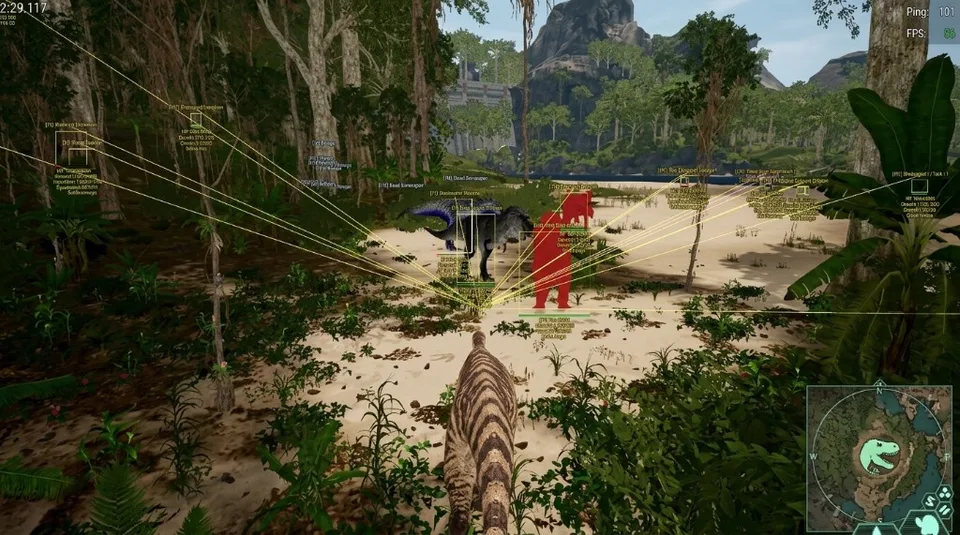
The Isle player ESP: boxes, names, and distance
How player ESP presents nearby survivors with box, name, and distance information.
Player ESP is the overlay people mean when they search for The Isle player ESP. It marks other survivors so you spend less time guessing whether a sound is a human or a dinosaur. Compare the live toggles on the features page and store before you assume every option is on.
What the listing includes
The current product list includes box ESP, name ESP, distance ESP, player direction, a head dot, snaplines, and a visible-check option. Enable only the labels you can read while sprinting or scenting. The preview gallery shows how those layers look in screenshots.
| Option | What it helps with |
|---|---|
| Box ESP | A silhouette through terrain |
| Name ESP | Which survivor you are looking at |
| Distance ESP | Whether they are in fight range |
| Direction / snapline | Where to turn when you lose line of sight |
Keep the overlay quiet
A max-distance filter is listed. Use it. Drawing every player on a busy server is harder to read than a short range that matches how The Isle actually plays. Pair player ESP with radar if you want a second local cue, and keep dinosaur ESP for wildlife so the two lists stay separate.
If you are still learning the names, start with ESP terminology and the Evrima overview. Then return to setup before you join a populated server.